Part 3: BigDecimal - When Doubles Aren't Enough
22 Dec 2025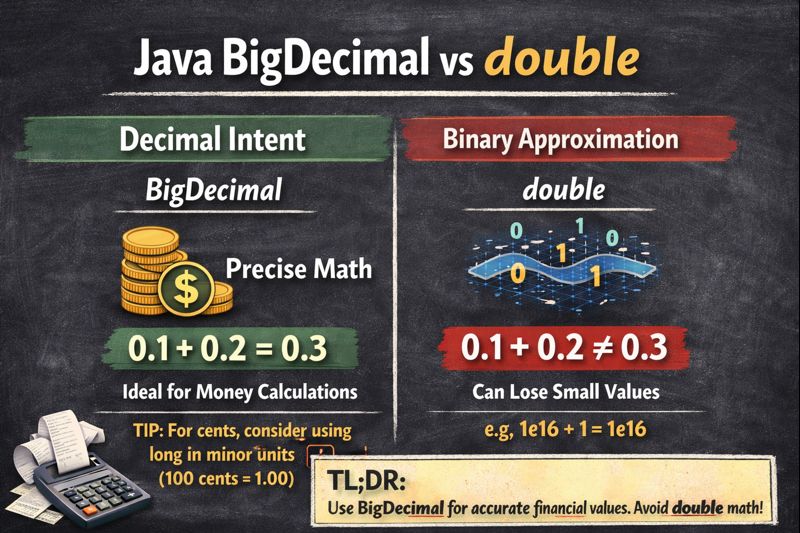
This post is part of my Floating Point Without Tears series on how Java numbers misbehave and how to live with them.
In my earlier post on IEEE 754 doubles I showed how a tiny Java example could break your intuition about numbers. The JVM was not being sloppy. It was faithfully following the floating point rules. The surprise came from my mental model, not from the hardware.
BigDecimal is Java’s answer to a different problem: what if I actually need decimal correctness, not fast binary approximation? It is the type you reach for when cents matter, reconciliation matters, or auditors matter.
It is less magical than it looks.
TL;DR: Use new BigDecimal("0.1") for decimal values in your code. Only use BigDecimal.valueOf(double) when you’re already stuck with a double from external sources.
Quick Reference
Before we dive in, here’s what you need to remember:
// ✓ Correct ways to create BigDecimal for money
new BigDecimal("0.1");                   // String literal
new BigDecimal("123.45");                // String literal
BigDecimal.valueOf(10).movePointLeft(1); // 10 × 10^-1 = 1.0

// ✗ Wrong for hardcoded decimal values
new BigDecimal(0.1);        // Exposes the binary approximation as decimal
Doubles speak binary, your domain speaks decimal
double is brilliant for physics, graphics, simulations, and anything where small error is acceptable. It is terrible at representing human money. The root cause is simple. Doubles are binary fractions. Money is decimal.
0.1 rupee or dollar has no exact representation in binary floating point. When you write:
double x = 0.1;
System.out.println(x);              // prints 0.1 (canonical string)
System.out.printf("%.20f%n", x);    // 0.10000000000000000555...
you are already off by a tiny amount, even though the default printout shows 0.1. Most of the time you are happy to ignore that tiny tail (technically binary approximation). But then you sum millions of rows, or reorder operations, or start comparing for equality, and the tail starts wagging the dog.
BigDecimal cuts across this by working in base 10.
BigDecimal’s mental model
Conceptually, a BigDecimal is two things glued together:
- An integer representing all the digits, without any decimal point.
- A scale that says where the decimal point lives.
Formally:
value = unscaledValue × 10^(-scale)
So:
BigDecimal amount = new BigDecimal("123.45");internally becomes:
unscaledValue = 12345scale = 2- logical value =
12345 × 10^-2 = 123.45
Because the unscaled integer is exact, decimal values like 0.1, 0.01, 1234567890.12 are also exact. There is no “closest representable value” the way there is with double. You only lose information when you explicitly ask BigDecimal to round (via MathContext or setScale).
How the JDK actually stores it
That is the spec view. Under the hood in OpenJDK, the class looks roughly like this:
public class BigDecimal extends Number
        implements Comparable<BigDecimal> {

    // Compact form when it fits in a long
    private transient long intCompact;

    // Full form when it doesn't
    private BigInteger intVal;

    // Digits after the decimal point
    private int scale;

    // Cached number of significant digits
    private transient int precision;

    // Marker for "no compact long, use intVal instead"
    static final long INFLATED = Long.MIN_VALUE;
}
So BigDecimal actually has two representations for the unscaled value:
- Compact mode: if the unscaled integer fits in a 64-bit
long, it lives inintCompactandintValisnull. This is the fast path for “small enough” numbers. - Inflated mode: if it does not fit,
intCompactis set toINFLATEDand the digits live inintValas aBigInteger.
This optimization means small monetary amounts stay fast, while supporting arbitrarily large values when needed.
Your 123.45 example fits happily in compact form:
intCompact = 12345LintVal = nullscale = 2
Never construct BigDecimal from a double
A classic foot-gun looks like this:
BigDecimal a = new BigDecimal(0.1);
BigDecimal b = new BigDecimal("0.1");

System.out.println(a); // 0.1000000000000000055511151231257827021181583404541015625
System.out.println(b); // 0.1
The first line takes the binary double for 0.1 and converts it directly into an exact decimal. The double is already an approximation, so you get the full fraction printed out.
The second line parses the string "0.1" as a decimal value. There is no binary detour, so you get exactly one tenth.
You have not “fixed” the double by wrapping it in a BigDecimal. You have just made its approximation painfully visible.
What about BigDecimal.valueOf() and canonical strings?
This is where people get confused:
BigDecimal a = new BigDecimal(0.1);
BigDecimal b = BigDecimal.valueOf(0.1);

System.out.println(a);
// 0.1000000000000000055511151231257827021181583404541015625

System.out.println(b);
// 0.1
Same literal 0.1, two different worlds.
The difference is that valueOf goes through the canonical decimal string of the double.
Route 1: new BigDecimal(0.1)
This constructor works directly from the binary bits of the double:
- The double for
0.1is not exactly one tenth. - It is some messy binary fraction very close to 0.1.
new BigDecimal(double)asks: “What is the exact decimal value of this binary fraction?”
So you see the full binary approximation:
0.1000000000000000055511151231257827021181583404541015625
Ugly, but honest.
Route 2: BigDecimal.valueOf(0.1) and canonical decimal strings
valueOf takes a different path:
public static BigDecimal valueOf(double val) {
    return new BigDecimal(Double.toString(val));
}
The key piece here is Double.toString(val). That method does not dump all the internal bits. Instead, it produces the canonical decimal string for that double:
The shortest decimal string that, if you parse it back with
Double.parseDouble, gives you exactly the same double bits.
In code, it guarantees:
double x = ...;
String s = Double.toString(x);
double y = Double.parseDouble(s);

assert Double.doubleToLongBits(x) == Double.doubleToLongBits(y);
For the double that represents 0.1, that canonical string happens to be:
Double.toString(0.1); // "0.1"So the pipeline for BigDecimal.valueOf(0.1) is:
- Start from the binary double for 0.1.
- Turn it into its canonical decimal string
"0.1"– a decimal string with just enough digits to round back to the same double (i.e., to distinguish it from adjacent doubles). - Feed that string into
new BigDecimal("0.1").
Result: an exact decimal 0.1, not the giant tail.
So you can summarise it like this:
new BigDecimal(0.1)= “give me the exact decimal value of this weird binary fraction”.BigDecimal.valueOf(0.1)= “give me the exact decimal value of the canonical string\"0.1\"for this double”.
The rounding error happened earlier, when you chose a double to represent 0.1 at all. valueOf doesn’t fix that choice, but it gives you a clean, canonical decimal view of that double instead of the raw fraction.
When to use valueOf()
valueOf is useful, and often preferred, in three situations:
// Fine for integers
BigDecimal cents = BigDecimal.valueOf(12345); // 12345

// When you're stuck with a double from legacy code
double legacyPrice = thirdPartyApi.getPrice();   // You can't control this
BigDecimal price = BigDecimal.valueOf(legacyPrice)
    .setScale(2, RoundingMode.HALF_UP);          // Accept the loss, make it explicit

// When building decimal values programmatically from integers
BigDecimal tenth = BigDecimal.valueOf(1).movePointLeft(1);  // Start from exact integer 1
But for hardcoded monetary values in your own code, skip doubles entirely and use string literals:
BigDecimal price = new BigDecimal("0.10");The real rule is about where the value originates:
- If the value is born in your domain as a decimal (prices, rates, balances), create it from a decimal representation (
String,long+ scale). - If the value is already stuck in a
double, useBigDecimal.valueOf(double)and treat that conversion as a boundary where precision may already have been lost.
BigDecimal will not magically repair a bad choice of primitive type.
Quick comparison
| Expression | Result | Use Case |
|---|---|---|
new BigDecimal("0.1") |
Exact decimal 0.1 | Hardcoded money |
new BigDecimal(0.1) |
0.10000000000…05511 (binary approximation) | Never use this |
BigDecimal.valueOf(0.1) |
0.1 (canonical string) | When stuck with double |
BigDecimal.valueOf(1, 1) |
0.1 (1 × 10^-1) | Programmatic creation |
Exact sums, predictable cents
Here’s a comparison showing why BigDecimal matters for financial code:
// With doubles - unpredictable
List<Double> doubleAmounts = List.of(
    10000000000000000.00,
    1.00, 1.00, 1.00, 1.00
);
double doubleSum = doubleAmounts.stream()
    .mapToDouble(Double::doubleValue).sum();
System.out.println(doubleSum); // 1.0000000000000004E16
The result is mathematically correct (10^16 + 4), but the representation shows how rounding noise creeps in when you mix huge and small magnitudes in binary floating point. At this scale, many consecutive integers are not exactly representable as double, so tiny adjustments end up living in the low bits and surfacing as …0004E16.
Now compare with BigDecimal:
// With BigDecimal - exact
List<BigDecimal> amounts = List.of(
    new BigDecimal("10000000000000000.00"),
    new BigDecimal("1.00"),
    new BigDecimal("1.00"),
    new BigDecimal("1.00"),
    new BigDecimal("1.00")
);
BigDecimal sum = amounts.stream()
    .reduce(BigDecimal.ZERO, BigDecimal::add);
System.out.println(sum); // 10000000000000004.00
No matter how you reorder the BigDecimal list, you will get the same 10000000000000004.00. There is no hidden rounding based on magnitude, because the arithmetic is done on the unscaled integers.
You pay for this determinism. BigDecimal operations are typically 10-100× slower than double, depending on the values involved. But when you reconcile two systems and everything lines up to the last cent, you know where the extra CPU cycles went.
Scale, rounding, and the joy of being explicit
With doubles, rounding is automatic and mostly invisible. With BigDecimal, rounding is very much your problem.
Imagine you need to divide 1 rupee into 3 equal parts:
BigDecimal one = new BigDecimal("1.00");
BigDecimal three = new BigDecimal("3.00");

BigDecimal each = one.divide(three); // Kaboom: ArithmeticException
The exception is deliberate. 1 / 3 in decimal form is 0.3333… forever. BigDecimal refuses to guess how many digits you want. You must say how you want the result rounded.
There are two approaches, and knowing when to use which matters.
MathContext: For intermediate calculations
Use MathContext when you need to control significant digits during computation:
// Calculate pi as 22/7 with 10 significant digits
MathContext mc = new MathContext(10, RoundingMode.HALF_UP);
BigDecimal pi = new BigDecimal("22").divide(
    new BigDecimal("7"),
    mc
);
System.out.println(pi); // 3.142857143
setScale: For final results
Use setScale when you need to control decimal places for presentation or storage:
// Round a calculated price to 2 decimal places for currency
BigDecimal rawPrice = new BigDecimal("12.3456");
BigDecimal price = rawPrice.setScale(2, RoundingMode.HALF_UP);
System.out.println(price); // 12.35
The pattern that works
For currency, a clean approach is:
- Decide how many decimal places your business uses (usually 2 for most currencies)
- Store all monetary values with that scale
- When you need intermediate higher precision, use a
MathContextlocally - Bring the value back to your standard scale at the boundaries
BigDecimal rate = new BigDecimal("0.0525"); // 5.25% interest rate
BigDecimal principal = new BigDecimal("1000.00");

// Higher precision for calculation
MathContext mc = new MathContext(10, RoundingMode.HALF_UP);
BigDecimal interest = principal.multiply(rate, mc);

// Round to cents for storage
interest = interest.setScale(2, RoundingMode.HALF_UP);
System.out.println(interest); // 52.50
Equals is not the same as compareTo
There is a subtle trap buried in BigDecimal’s API:
BigDecimal x = new BigDecimal("1.0");
BigDecimal y = new BigDecimal("1.00");

System.out.println(x.equals(y));    // false
System.out.println(x.compareTo(y)); // 0
equals cares about both value and scale. The unscaled integer is 10 vs 100, scale is 1 vs 2, so the objects are not “equal”.
compareTo cares only about numeric value. From that point of view they are both exactly one, so the comparison says zero.
If you put BigDecimal keys into a HashMap or HashSet, you are using equals. If you put them in a TreeMap or TreeSet, you are using compareTo. That difference has bitten enough people that the Javadoc has an explicit warning1.
What to do about it
For financial applications, you typically want value-based comparison:
// Use compareTo for all business logic
if (price.compareTo(threshold) > 0) {
    applyDiscount();
}

// Or normalize scale before storing in collections
BigDecimal normalized = value.setScale(2, RoundingMode.UNNECESSARY);
priceSet.add(normalized);
Common mistakes
Beyond the double constructor trap, watch out for these.
Using == for comparison
// Wrong
if (price == threshold) { ... }

// Right
if (price.compareTo(threshold) == 0) { ... }
Forgetting rounding mode
// Throws ArithmeticException
BigDecimal result = amount.divide(three);

// Specify your intent
BigDecimal result = amount.divide(three, 2, RoundingMode.HALF_UP);
Mixing scales carelessly
BigDecimal a = new BigDecimal("1.0");   // scale 1
BigDecimal b = new BigDecimal("2.00");  // scale 2
BigDecimal sum = a.add(b);              // scale 2 (max of the two)

// Result may have unexpected scale; normalize when it matters
// Note: UNNECESSARY throws ArithmeticException if rounding would be needed
sum = sum.setScale(2, RoundingMode.UNNECESSARY);
When should you actually use BigDecimal?
BigDecimal is not a “better double”. It is a different tool.
Reach for BigDecimal when:
- You are working with money, interest rates, exchange rates, or anything that must reconcile to the cent or paise
- You are implementing rules that are written in decimal terms by humans and regulators, not in binary terms by hardware engineers
- You care more about correctness and determinism than raw speed
Stay with doubles when:
- You are doing heavy numeric computing, simulations, statistics, graphics, or ML workloads where small rounding error is acceptable and performance dominates
- You are counting in powers of two, not powers of ten
- The measurements themselves are imprecise (sensor readings, physical measurements)
You can always convert between the two worlds at clearly defined boundaries.
Closing thought
BigDecimal is not slow magic. It is a disciplined refusal to lie about decimals.
Doubles take a binary view of the universe and do their best to approximate your decimal stories. BigDecimal takes your decimal stories literally and forces you to be explicit about where information is lost.
Neither is the “right” choice in isolation. The trick is to know which world you are in.
References
-
BigDecimal Java 17 JavaDocs: https://docs.oracle.com/en/java/javase/17/docs/api/java.base/java/math/BigDecimal.html#equals(java.lang.Object) ↩